Event ID 1102: Audit Log Cleared (and Event ID 104)
Event ID 1102 means the Windows Security log was cleared; 104 means the System or another log was. See who did it, why it survives, and Splunk and KQL searches.
EpicDetect Team
10 min read
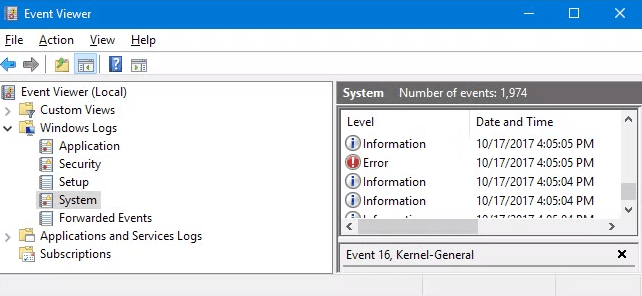
Event ID 1102: The Audit Log Was Cleared (and Event ID 104)
Event ID 1102 means the Windows Security log was cleared. It is written to the Security log itself, records the account that did it, and you should almost never see it outside a planned change, so treat every one as worth a look.
Its sibling is Event ID 104, which lands in the System log when the System log or another non-Security log (such as Application) is cleared. This post covers both events, how attackers clear logs, why the clear event survives the wipe, and searches for Splunk and Microsoft Sentinel. For the wider list of IDs worth knowing, see our Windows Event Log IDs cheat sheet.
What is the difference between Event ID 1102 and Event ID 104?
Both say "a log was cleared". They differ in which log was cleared and where the record is written.
| Event ID 1102 | Event ID 104 | |
|---|---|---|
| Message | The audit log was cleared. | The <log name> log file was cleared. |
| Written to | Security log | System log |
| Fires when | The Security log is cleared | The System log or another log (Application, for example) is cleared |
| Provider | Microsoft-Windows-Eventlog | Microsoft-Windows-Eventlog |
| Needs an audit policy? | No. It is in the "Other Events" group, which Microsoft says is generated automatically and enabled by default | No |
| Who did it | Subject: Security ID, Account Name, Account Domain, Logon ID | Account name and domain in the event data, plus the name of the cleared log |
Microsoft's guidance on 1102 is blunt: "Typically you should not see this event. There is no need to manually clear the Security event log in most cases." Its Windows Event Forwarding guide collects 1102 and 104 in its baseline subscription and labels them "Security Log cleared events (1102)" and "Other Log cleared events (104)", with the note that a cleared log "could indicate an intruder that is covering their tracks."
Where is Event ID 1102 logged, and what does it record?
Open Event Viewer, go to Windows Logs, then Security, and filter the current log for 1102. You do not need to turn anything on. Event 1102 sits in the "Other Events" subcategory, alongside 1100 (the event logging service has shut down) and 1104 (the security log is now full), and those are logged by default.
The fields that matter:
| Field | XML name | What it tells you |
|---|---|---|
| Security ID | SubjectUserSid | SID of the account that cleared the log |
| Account Name | SubjectUserName | The name of that account |
| Account Domain | SubjectDomainName | Its domain, or the computer name for a local account |
| Logon ID | SubjectLogonId | The session it happened in. Match it to the 4624 logon that started the session |
| Computer | Computer | The host whose log was wiped |
That Logon ID is your best pivot. It links the clear to the logon event that opened the session, which tells you how the account got onto the machine: interactive, RDP or a network logon from another host.
Event 104 carries a smaller set of data: the account name and domain that cleared the log, and the name of the log that was cleared (the event message reads "The System log file was cleared", or Application, and so on). Read that name before you react. A cleared Application log on a developer's laptop and a cleared System log on a domain controller are not the same story.
How do attackers clear Windows event logs?
MITRE ATT&CK tracks this as T1070.001, Indicator Removal: Clear Windows Event Logs, under the Defense Evasion tactic. Attackers clear logs to hide what they did on a host, usually near the end of their time on it. With administrator rights, there are three common ways.
1. wevtutil. The built-in command-line tool. Microsoft documents cl (or clear-log) as the command that "clears events from the specified event log". ATT&CK lists exactly these examples:
wevtutil cl system
wevtutil cl application
wevtutil cl security
The same tool's el command lists every log on the machine, which is why you sometimes see a loop that enumerates and clears them all.
2. PowerShell. The Clear-EventLog cmdlet deletes all entries from the logs you name, locally or on remote machines, and needs membership of the Administrators group:
Clear-EventLog -LogName Application, System, SecurityClear-EventLog works only on classic event logs (Application, System, Security and similar), and it is a Windows PowerShell 5.1 cmdlet.
3. Event Viewer. Select a log and choose Clear Log. Same result, but it needs someone at the console or on RDP.
Some attackers skip clearing and delete the stored .evtx files under C:\Windows\System32\winevt\logs\, which ATT&CK also describes. Others stop the logging service or change the audit policy, which is why 1100 (event logging service shut down) and 4719 (system audit policy was changed) belong in the same detection group.
Why does the clear event survive the clear?
Because Windows writes it after the wipe. When the Security log is cleared, the old events are gone and 1102 becomes the first record in the fresh, empty log. Microsoft's own Clear-EventLog example shows it: after clearing every log, the System and Security logs already have entries again, and Microsoft notes "a few entries were added to the System and Security logs after the logs were cleared."
So the attacker who clears the Security log leaves one event behind, and it names their account.
It also means a short, nearly empty Security log on a busy server is suspicious on its own. If the oldest event on a domain controller is a 1102 from twenty minutes ago, you already know something happened.
Why is forwarding logs off the host the real defence?
Detecting 1102 tells you the evidence is gone. It does not bring it back. The defence is to get events off the machine before anyone can wipe them, so the copy in your SIEM survives whatever happens on the endpoint.
- Windows Event Forwarding (WEF) sends chosen events to a Windows Event Collector server. Microsoft's baseline subscription already includes 1102, 1100 and 104.
- A SIEM agent (the Splunk Universal Forwarder, the Azure Monitor Agent for Sentinel, or your vendor's equivalent) does the same job for your SIEM.
Two caveats from Microsoft's WEF documentation. First, the local event log is the forwarding buffer, so events that are cleared or overwritten before they are sent are lost, and the collector gets no notice of the gap. Second, by default a WEF subscription only forwards events generated after the client received the subscription. Forward continuously and watch for hosts that go quiet.
When logs are forwarded, the clear stops being destructive. You still have every event the attacker wanted gone, and now you also have a 1102 that tells you exactly when they decided to hide. That timestamp is a useful anchor when you build an attack timeline.
How do you search for Event ID 1102 and 104?
Splunk
These assume the Splunk Add-on for Microsoft Windows with classic event log inputs, so the field names are the add-on's (EventCode, Account_Name, New_Process_Name, Process_Command_Line).
Every log clear, Security or otherwise:
(source="WinEventLog:Security" EventCode=1102) OR (source="WinEventLog:System" EventCode=104)
| eval cleared_log=if(EventCode=1102, "Security", "see Message")
| table _time host EventCode cleared_log Account_Name Message
| sort - _time
The command that did it, from process creation events (4688 with command-line auditing turned on):
source="WinEventLog:Security" EventCode=4688 New_Process_Name="*\\wevtutil.exe"
(Process_Command_Line="* cl *" OR Process_Command_Line="*clear-log*")
| table _time host Account_Name Process_Command_Line
KQL (Microsoft Sentinel)
Event 1102 is in the Security log, so it arrives in the SecurityEvent table:
SecurityEvent
| where EventID == 1102 and EventSourceName == "Microsoft-Windows-Eventlog"
| project TimeGenerated, Computer, Account, Activity
Event 104 is not. It is a System log event, so it never appears in SecurityEvent. It lands in the Event table, and only if your data collection rule collects the System log. Pick the right table or the search will silently return nothing:
Event
| where EventLog == "System" and EventID == 104 and Source == "Microsoft-Windows-Eventlog"
| extend ClearedLog = extract(@"<Channel>([^<]*)<", 1, EventData)
| extend ClearedBy = extract(@"<SubjectUserName>([^<]*)<", 1, EventData)
| project TimeGenerated, Computer, ClearedLog, ClearedBy, RenderedDescription
RenderedDescription holds the readable message, so you still see which log was cleared if the extract calls come back empty in your workspace.
To catch the command as well as the result:
SecurityEvent
| where EventID == 4688 and NewProcessName endswith @"\wevtutil.exe"
| where CommandLine contains " cl " or CommandLine contains "clear-log"
| project TimeGenerated, Computer, Account, CommandLine
What are the false positives for Event ID 1102?
There are few, which is why this event makes a good alert.
- Planned maintenance. An admin clears a log during troubleshooting, or a build process clears logs before a machine image is captured. Check for a change ticket and whether the account is a known admin.
- Labs and test machines. Security training labs, malware sandboxes and dev VMs get reset and cleared all the time. Tag them in your SIEM and suppress them by host.
- Event 104 for minor logs. Some applications and admins clear their own operational logs. The log name in the event tells you which, so judge it by that.
What should raise your pulse: a clear on a server or domain controller, a clear by an account that is not a known admin, a clear shortly after an unusual logon (check the Logon ID), several logs cleared within seconds of each other, or a clear on a host that then stops sending events.
Related event IDs
- 1100: the event logging service has shut down. Normal during shutdown, suspicious when it is not followed by a reboot.
- 4719: system audit policy was changed. The quieter way to blind a host.
- 4688: process creation. Catches the
wevtutil clcommand itself. See Event ID 4688. - Sysmon Event ID 1: there is no Sysmon event for a log clear, but Sysmon process creation catches
wevtutil.exeandpowershell.exedoing the clearing, with hashes and parent process. See Sysmon Event ID 1. - 4104: PowerShell script block logging. Shows a
Clear-EventLogcall made inside a script.
FAQs
What is event ID 1102?
Event ID 1102 is "The audit log was cleared." Windows writes it to the Security log every time the Security log is cleared, and it records the account name, domain, SID and Logon ID of whoever cleared it.
What is Windows event ID 104?
Event ID 104 is written to the System log when the System log or another non-Security log is cleared. The message names the log, for example "The System log file was cleared." It is the 1102 equivalent for everything except the Security log.
What is the log cleared event ID?
It depends on the log. Clearing the Security log produces 1102 in the Security log. Clearing System, Application and most other logs produces 104 in the System log. Alert on both.
Can an attacker clear logs without generating event 1102?
Clearing the Security log with wevtutil, PowerShell or Event Viewer generates 1102. Attackers who want to avoid it use other methods, such as deleting the .evtx files or stopping the logging service, which is why you should also watch 1100, 4719 and hosts that stop sending events.
Is event code 1102 always malicious?
No, but it is rare and should always be explained. Microsoft says you typically should not see it. Check for a change ticket, the account, and what that session did before the clear.
TL;DR
Event ID 1102 means the Security log was cleared, is logged by default, and names the account that did it. Event ID 104 means the System log or another log was cleared, and it lands in the System log, so in Sentinel you search the Event table, not SecurityEvent. Attackers clear logs with wevtutil cl, Clear-EventLog or Event Viewer (T1070.001), but the clear event is written after the wipe, so it survives. The real defence is forwarding events off the host so the evidence already lives somewhere the attacker cannot reach.
How EpicDetect Can Help
Knowing that 1102 means "someone hid something" is step one. Working out what they hid, from the evidence that is left, is the job. Our free cases are single investigations at a fictional finance firm: you work the evidence in an email, threat intel, log search or endpoint console, pin what supports your call, and close with a verdict and IOCs.
For a longer story, Adventures Season Zero is five free episodes where you are the new analyst on your first week. The Atlas maps what to learn next, from SOC fundamentals to detection, and Security+ prep (a free practice test and daily drill) sits in the same account.
Start free. No card needed.
Tags
Related Articles
Event ID 4624: Windows Logon Types Explained
Event ID 4624 is a successful Windows logon. See every logon type (2, 3, 10 and more), the fields to read, Logon ID correlation and how 4625 failures fit in.
Event ID 4688: Process Creation and Command Line Logging
Event ID 4688 logs every new Windows process. How to enable command line logging, read token elevation and parent fields, and compare 4688 with Sysmon Event ID 1.
Event ID 7045 vs 4697: New Service Installed (Windows)
Event ID 7045 (System log) and 4697 (Security log) both record a new Windows service. Compare fields, spot PsExec and persistence, and search Splunk and KQL.
Event ID 4720 and 4732: Account Created, Added to Admins
Event ID 4720 means a user account was created. Learn 4722, 4732, 4728 and 4756, the fields that matter, and Splunk and KQL to catch new admin accounts.