Sysmon Event IDs 12, 13 and 14: Registry Monitoring Explained
Sysmon Event IDs 12, 13 and 14 log registry key and value changes. Learn the fields, which keys to watch, a targeted config and Splunk searches.
EpicDetect Team
10 min read
Sysmon Event IDs 12, 13 and 14: Registry Monitoring Explained
The Windows registry is where malware goes to survive a reboot. Run keys, service paths, security settings: if an attacker wants to stay on a machine, they almost always touch it.
Sysmon watches the registry with three events. Event ID 12 is a key or value created or deleted, Event ID 13 is a value set, and Event ID 14 is a key or value renamed. This post covers the fields, the keys worth watching, a config that will not melt your SIEM, and Splunk searches. For the full list of events, see our Sysmon Event IDs cheat sheet.
What do Event IDs 12, 13 and 14 log?
Microsoft's documentation describes them as:
- Event ID 12, RegistryEvent (Object create and delete): "Registry key and value create and delete operations."
- Event ID 13, RegistryEvent (Value Set): identifies registry value modifications. The docs say the event records the value written for
DWORDandQWORDvalues. - Event ID 14, RegistryEvent (Key and Value Rename): records the new name of the key or value that was renamed.
All three use one config tag, RegistryEvent, so you filter on EventType to separate them. The fields you will use:
EventType:CreateKeyorDeleteKey(ID 12),SetValue(ID 13),RenameKey(ID 14).TargetObject: the full path of the key or value. When a value is involved, the value name is appended to the key path.Details: on Event 13, what was written. On Event 14 the field isNewNameinstead.Image: the process that made the change. This is usually the first thing to read.ProcessGuidandProcessId: link the change to the process and its other Sysmon events.UtcTimeandRuleName.
Sysmon shortens the root keys: HKEY_LOCAL_MACHINE becomes HKLM, HKEY_USERS becomes HKU, and HKEY_LOCAL_MACHINE\System\ControlSet00x becomes HKLM\System\CurrentControlSet. Per-user changes show up under HKU\<user SID>\... rather than HKCU, so a rule that matches HKCU will never fire. Use contains or end with on TargetObject for those.
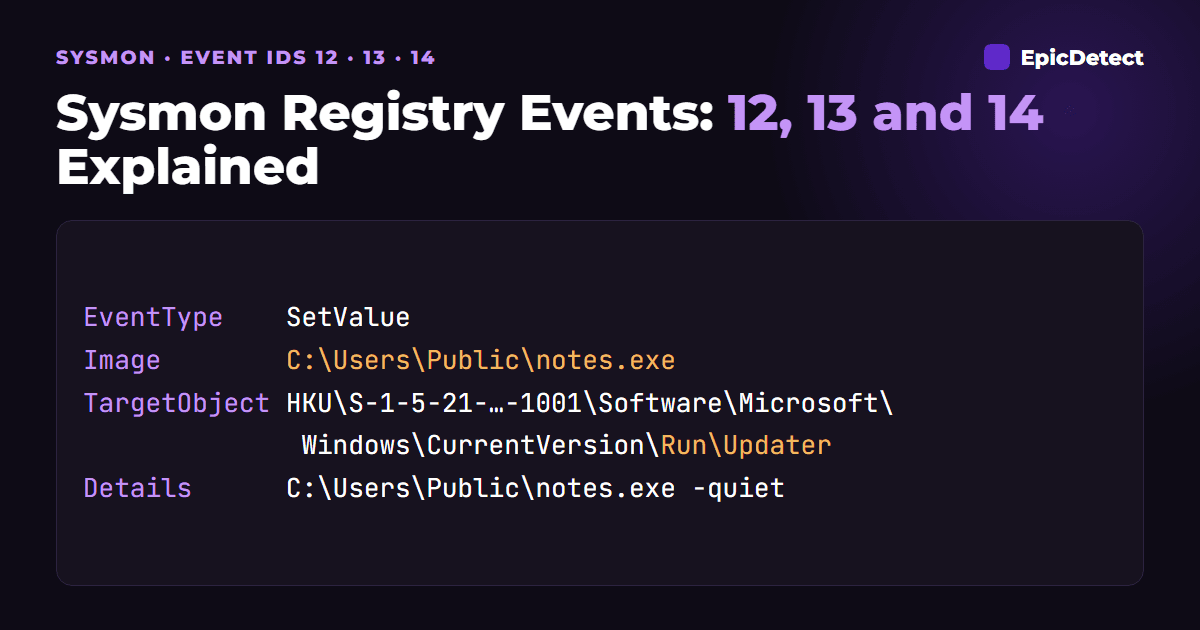
Here is a trimmed Event ID 13, a value added to a user Run key by a process in a public folder (documentation address and a made-up SID):
<EventData>
  <Data Name="RuleName">-</Data>
  <Data Name="EventType">SetValue</Data>
  <Data Name="UtcTime">2026-10-24 09:21:44.208</Data>
  <Data Name="ProcessGuid">{8c1f4d2a-3b7e-6540-5e02-000000001f00}</Data>
  <Data Name="ProcessId">4812</Data>
  <Data Name="Image">C:\Users\Public\notes.exe</Data>
  <Data Name="TargetObject">HKU\S-1-5-21-1111111111-2222222222-3333333333-1001\Software\Microsoft\Windows\CurrentVersion\Run\Updater</Data>
  <Data Name="Details">C:\Users\Public\notes.exe -quiet</Data>
</EventData>
The value name is Updater, it lives under CurrentVersion\Run, and it points back at the same file that wrote it. That file will now start every time this user logs on. For string values you will usually see the string in Details, but check that on your own hosts rather than assume it.
Why can't I log all of it?
Because the registry is constantly busy. Windows, installers, Group Policy and every application read and write it all day. Turn on every registry event and you will drown your SIEM and slow down the host.
So registry monitoring works the other way round from process creation. You do not exclude noise from a firehose. You include only the specific keys attackers are known to use. Sysmon's own docs say rules for the same field are OR conditions and rules on different fields are AND conditions, and the community guidance is blunt: start small, watch the volume, expand slowly.
What does it catch?
Run key persistence
A new value under CurrentVersion\Run or RunOnce starts a program at logon (MITRE ATT&CK T1547.001). It is a long-standing persistence technique. HKLM Run keys affect every user and usually need admin rights. HKU Run keys affect one user and need none.
What to check: Image (what wrote it), Details (what will run) and the path it points to. A Run value pointing into \Users\Public\, \AppData\ or \Temp\ is a lead.
Service changes
Services live under HKLM\System\CurrentControlSet\Services\<name>. Changes to ImagePath (the executable), ServiceDll (for DLL-hosted services) or Start (the start mode) can turn a service into a persistence mechanism or a way to run as SYSTEM (T1543.003). Pair this with Windows service-install events from our Windows Event IDs cheat sheet.
Turning off defenses
Tampering with Windows Defender keys, such as adding exclusions under Windows Defender\Exclusions\, or setting DisableAntiSpyware, is a classic defense-evasion move (T1562.001). Changes to UAC settings like EnableLUA belong in the same bucket.
Event 13 will not tell you whether the change worked, only that something tried to make it. Check Defender's own logs for the result.
Credential-related settings
HKLM\SYSTEM\CurrentControlSet\Control\SecurityProviders\WDigest\UseLogonCredential set to 1 enables storing plaintext passwords in memory for WDigest authentication, which the TrustedSec community guide lists as a common post-exploitation step. If you see it flip, look for what comes next, such as access to LSASS. See Sysmon Event ID 10.
Accessibility hijacks
A Debugger value under Image File Execution Options\sethc.exe (or utilman.exe, osk.exe and similar) makes Windows launch another program when someone presses Shift five times at the login screen. It is a way to get a SYSTEM shell without logging in (T1546.008 and T1546.012).
Deletes and renames
Event 12 with DeleteKey can mean cleanup: an attacker removing their own tracks after use, or an installer removing its keys. Event 14 is the quiet one. Renames are usually far fewer than sets, so a rename in a sensitive location is cheap to review. Baseline it on your own hosts, and treat both events as context, not verdicts.
What is normal and what is suspicious?
Normal:
- Installers and updaters writing Run keys and service entries, from signed, expected paths.
- Group Policy and management tools (such as SCCM) changing keys on a schedule across many hosts.
- Windows maintenance and Defender updating its own keys.
Suspicious:
- A script host (
powershell.exe,wscript.exe,cmd.exe) writing to persistence keys. - A process in a user-writable folder writing any autostart key.
Detailsthat points into a temp, public or profile folder, or contains an encoded command.- Security-tool keys changing outside a maintenance window or a change ticket.
How do I configure it?
Use targeted includes only. This is a minimal starting config focused on persistence, service paths and a few well-known abuse keys:
<Sysmon schemaversion="4.82">
  <EventFiltering>
    <RuleGroup name="" groupRelation="or">
      <RegistryEvent onmatch="include">
        <TargetObject name="run keys" condition="contains">\CurrentVersion\Run</TargetObject>
        <TargetObject name="service path" condition="end with">\ImagePath</TargetObject>
        <TargetObject name="service dll" condition="end with">\ServiceDll</TargetObject>
        <TargetObject name="wdigest" condition="end with">\WDigest\UseLogonCredential</TargetObject>
        <TargetObject name="defender exclusions" condition="contains">\Windows Defender\Exclusions\</TargetObject>
        <TargetObject name="ifeo debugger" condition="contains">\Image File Execution Options\</TargetObject>
      </RegistryEvent>
    </RuleGroup>
  </EventFiltering>
</Sysmon>
A few notes:
contains \CurrentVersion\Runalso matchesRunOnceand the per-user keys, which is what you want.- The
nameattribute on a rule shows up asRuleNamein the event, so your SIEM can group by it. - Test in a lab first and measure event volume over a day or two before you roll it out.
- To narrow by event type, add
<EventType condition="is">SetValue</EventType>to a rule. Rules on different fields combine as AND.
How do I hunt for it in Splunk?
These assume sourcetype="XmlWinEventLog:Microsoft-Windows-Sysmon/Operational" with fields parsed by the Splunk Add-on for Sysmon. Adjust the allowlists to your environment.
New Run key values from unusual processes:
sourcetype="XmlWinEventLog:Microsoft-Windows-Sysmon/Operational" EventCode=13
TargetObject="*\\CurrentVersion\\Run*"
NOT (Image="C:\\Windows\\*" OR Image="C:\\Program Files\\*" OR Image="C:\\Program Files (x86)\\*")
| table _time host User Image TargetObject Details
Service image path or DLL changes:
sourcetype="XmlWinEventLog:Microsoft-Windows-Sysmon/Operational" EventCode=13
(TargetObject="*\\Services\\*\\ImagePath" OR TargetObject="*\\Services\\*\\ServiceDll")
| table _time host Image TargetObject Details
Defender exclusions and WDigest:
sourcetype="XmlWinEventLog:Microsoft-Windows-Sysmon/Operational" EventCode=13
(TargetObject="*\\Windows Defender\\Exclusions\\*" OR TargetObject="*\\WDigest\\UseLogonCredential")
| table _time host Image TargetObject Details
Each of these returns who changed what, and from which process. Take the ProcessGuid of a hit back to Event ID 1 to see how that process started.
What false positives should I expect?
- Installs and updates. Legitimate software writes Run keys and services during setup. Check the signer and the path.
- Group Policy. It writes to many keys when policy refreshes, often at logon or on a timer.
- Management and EDR agents. Deployment tools make changes at scale. Document their behavior and allowlist by full path, not by name.
- Defender itself. Its own updates change its keys. Allowlist Defender processes by path, not the whole Defender key.
How does it fit with other Sysmon events?
Registry events are strongest as the second half of a story. Event 1 tells you what ran, Event 11 (file create) tells you what it dropped, and Events 12 and 13 tell you how it planned to come back. Use our Cases to practice linking them together.
FAQs
What is the difference between Sysmon Event IDs 12, 13 and 14?
Event 12 is a key or value created or deleted. Event 13 is a value set. Event 14 is a key or value renamed. They share the RegistryEvent config tag and are separated by the EventType field.
Does Sysmon log the value that was set?
Microsoft's docs say Event 13 records the value written for DWORD and QWORD values. In practice you usually also see string data in Details, but verify on your own hosts and Sysmon version.
Why is my HKCU rule not matching?
Sysmon logs per-user keys under HKU\<SID>, not HKCU. Use contains or end with on TargetObject.
Can I monitor the entire registry?
You should not. Registry activity is extremely high volume. Start with a short list of persistence and tamper keys and expand from there.
Does Event 13 prove an attack?
No. It proves a change happened. You decide whether it is bad from the process, the path and the context.
TL;DR
Sysmon Event IDs 12, 13 and 14 record registry keys created or deleted, values set, and keys renamed. You cannot log everything, so use targeted includes on Run keys, service paths, Defender and security settings, WDigest and IFEO. Read Image and Details first, then follow the ProcessGuid back to the process.
Sources:
- Sysmon on Microsoft Learn
- TrustedSec Sysmon Community Guide: registry actions
- SwiftOnSecurity sysmon-config
- MITRE ATT&CK T1547.001, T1543.003 and T1562.001
How EpicDetect Can Help
Registry artifacts make more sense when you have found them yourself. Our Cases are free, hands-on investigations that include endpoint forensics, so you practice reading evidence rather than memorizing it.
Want a story to follow? Adventures Season Zero is free and runs in your browser. For what to learn next, the EpicDetect Atlas maps it out.
Tags
Related Articles
Sysmon Event ID 22: DNS Query Logging Explained
Sysmon Event ID 22 logs DNS lookups with the process that made them. See the fields, what to hunt for, a starter config and Splunk searches.
Event ID 4720 and 4732: Account Created, Added to Admins
Event ID 4720 means a user account was created. Learn 4722, 4732, 4728 and 4756, the fields that matter, and Splunk and KQL to catch new admin accounts.

Sysmon Event ID 1: Process Creation Explained
Sysmon Event ID 1 logs every process start with its command line, parent, hash and user. Learn what it catches and how to search it in Splunk and KQL.
Sysmon Event ID 3: Network Connection Explained
Sysmon Event ID 3 logs TCP/UDP connections per process. Learn its fields, how to spot LOLBin beaconing and odd ports, with Splunk and KQL searches.